

The 3X3 Video Grid of Greatest Hits – from Dennis Yu

The 3×3 video grid helps people discover your all-time best videos.
These greatest hits are your Oscar moments. Your Emmies for outstanding acting. The unmissable 60 seconds of brilliance people must watch.
The 3×3 video grid is three each of your why, how, and what style videos.
Use the 3×3 grid to give people the best chance to get to know you, like you, and trust you. SO they will buy from you.
By definition, your best videos get the most ThruPlays and engagement.
And because these videos are your greatest hits you want all your audiences to watch them.
All your audience because they are potential clients.
This post is the step-by-step how-to set up a 3X3 video grid of Facebook Video for remarketing.
The TL: DR of this post is here
Through the Wide-Angle 🔭 – The 3X3 Video Grid is Your Brand Journey
Top of the funnel, cold audiences want to know you, like you and trust you before they buy from you. Trust is the underlying rationale of the 3X3 video marketing funnel. The 3 by 3 was thought up by Dennis Yu of Blitzmetric.
Why Facebook videos?
Because people love watching videos, social media algorithms love videos, and heaps of trust-building happen in those short and snappy 60-second videos.
- Film the video using your mobile phone in portrait mode.
- Make eye contact with the lens, don’t look at yourself, and
- do speak to the camera as if you’re chatting with a friend.
Here is a handy video format you should follow.
Do not edit the video with intro and outro bumpers, add captions or overlays.
By design, these videos are *raw* and *unpolished*. And raw and unpolished is the point.
Polished and professional videos look like an advertisement – and people ignore adverts.
Yet, don’t underestimate the *lack* of professionalism as cheap or amateurish. You will come across as real, approachable, and a *normal* person.
A business goal is to *convince* people to buy from you. Right? We’re not doing all this for the sake of fun!
These *Raw and unpolished* videos are like videos between friends.
And, because they are 1-minute snapshots in time they help people get to know you, trust you, relate to you, and finally trust you.
Don’t worry, I am Urban Renström, there is always science and research involved in everything I talk about, teach, and demonstrate.
One important aspect of Facebook video and the 3X3 video grid is the media buying part.
Often, like always people ask how much does advertising cost on Facebook? Begin with this Facebook ads spend calculator and find out, then download a copy for yourself.
Overview of the 3 X 3 Video Grid Funnel
The middle column of this graphic is the customer journey.
Read the middle section as a story (green to purple to grey boxes).
Audience #1 is served why videos until they “ThruPlay” any why video, then get automagically moved to audience #2 and get served why and how videos until they “Thruplay” any How videos, then get automagically moved to audience #3 and served How and What videos until they purchase (product and services) and then are moved to audience #4.

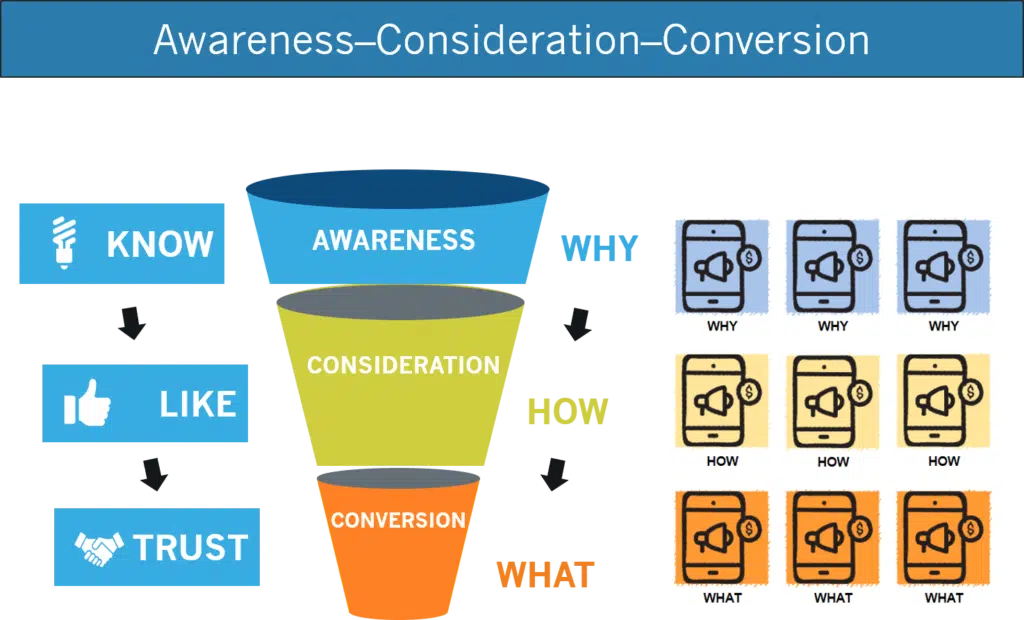
Interestingly, this why, how, and what concept overlaps exactly with the know, like, and trust phases. And and both overlap exactly with the ACC, (awareness, consideration, and conversion) funnel steps that Google, Facebook, Twitter use. See this image.
The Middle 1/3 *Why* to Client
1) Audience #1 is a saved, interests-based, LAL, or WCA, and
2) are served *why* videos until someone Thruplays any *why* video,
3) then those people (audience #1 Thruplay any *why* video) are moved into Audience #2,
4) Audience #2 are served both *why* and *how* videos until they Thruplays any *how* video,
5) then get moved to Audience #3,
6) and are served both *how* and *what* videos until they buy,
7) then get moved to Audience #4 and stop seeing any *why*, *how*, or *what* videos.
Onto the specifics.
Step 1 – Set up Four (4) Custom Audiences
The 3×3 video grid uses four custom audiences. Four customer audiences to move people from the top to the bottom of this Facebook video funnel.
Audience #1 is any number of saved, look-a-like (LAL), Page engagement, or a website customer audience, WCA audiences.
Audience #2 is a VvCA (Video View Custom Audience) containing all the people who ThruPlay any WHY video.
Audience #3 is different VvCA (Video View Custom Audience) containing all the people who ThruPlay any HOW video.
Audience #4 is a CLCA or a WCA (CLCA-Customer list Custom Audience – email list, WCA – people who landed on a thank you page after purchasing a product from you).
Note: ThruPlay is the default optimization for videos on the Facebook ads platform.

This post shows how to set up custom audiences.
Step 2 – Set up the 3X3 Video Grid

Go to the Ads Manager (inside of your Business Manager, don’t use your personal Facebook ads account) and start a new campaign, using the *Video View* campaign objective.
Click the Ad set level tab and set up three ad sets – one each for *why*, *how*, and *what* videos.
Click over to the Ad level tab and add your videos to the correct ad sets.
Your *why* and *how* videos are posted on your Facebook Public Profile Page. Right?
The *what* videos are published on your Facebook Business page.
Step 2a – The *Why* Ad Set
Audience #1: Is your saved, look-a-like (LAL), Page engagement, or website custom audience.

Exclude: Audiences #2, 3, and 4
Budget & Schedule: use a €1/day–forever!
Joking. Yet, there is a tale of truth in the *forever*, as the why ads set are cold audience, TOF, into your 3×3 grid.
There is an untapped pool of people you want to view your greatest hit videos.
Another content marketing term for the greatest hit is ‘evergreen‘. So yeah a €1/day forever is not far from the mark.
You want *all* new audience segments to watch your evergreen videos.
Step 2b – The *How* Ad Set
Use Audience #2 – people who ThruPlay any *why* video.
Exclude: Audience #3, 4

Budget & Schedule: use a €1/day forever!
Step 2c – *What* Ad Set
Use Audience #3 – people who achieved ThruPlay of one *how* video.

Exclude: Audience #1, 2, 4
Budget & Schedule: This will not be a €1/day, as you are seeking conversions. The audience size is small. Smaller audiences cost more. The budgeting suggestion is €/2-10.
Monitor the ad delivery frequency so you don’t annoy people. As they can easily block you.
High ad frequency is >3. You can also use the Rules feature inside the ads manager to monitor the ad delivery frequency.
Scheduling is forever!
Step 2d -The Final Audience
Audience #4. Comprise people who are your clients. People who purchased one of your courses, services, or packages.

Exclude: Audience #1, 2, 3
Budget & Schedule: N/a
Two methods to get people into this audience. One – upload your client email list to Facebook and create a Customer List Custom Audience, CLCA.
The second method is redirecting people, post-purchase to a *thank you for purchasing page* on your website.
If people login to Facebook whilst doing the above, they will become pixeled as having visited this page and you can create a website custom audience, WCA, from that page (URL). To get pixeled the Facebook Pixel must be installed on your website.
Note: when creating Audience #2 and 3 choose the third option down (see the red #6 bubble).
Interesting to note that Facebook provides 7 different video view custom audience options.
Each of the seven offers loads of possibilities for future campaigns.

Step 3 – 3×3 Video Grid Adverts

Recall the *why* and *how* videos are published on your Facebook Public Profile Page and the *what* videos are on your Facebook Business page.
Mind you! – people consume content differently and differently throughout the day.
Therefore, video is necessary but not sufficient modality to satisfy your audience’s desire for answers in different ways – audio, video, text etc.
Begin publishing videos and then create articles, pull quotes, and podcasts. These 100 pieces of content from 1 content marketing post summarize that process.
The Ad Setup for the 3×3 video grid begins in the Ads tab (red arrow).
Click either the 1) Create, 2) Duplicate, 3) Duplicate or 4) click the ellipse when editing an advert and then the Duplicate button.

Step 3a – The *Why* Ads

Add your three why videos to your *why* ad set, using the post ID.
Create the first advert by adding the post ID, then you can *Create* a new one or use the Duplicate function to add three adverts.
Each advert uses its own unique Ad ID taken from the Facebook post.
Note: Each ad set (according to Facebook) supports up to 50 individual ads.
But! Only 1% of advertisers require 50 ads and I am fairly certain that 80% of that 1% are better off using the dynamic ads feature.
Step 3b – The *How* Ads
As with the *why* adverts create the first advert then use the Create or Duplicate function to create a total of six adverts.
Use the same *why* post from the *why* ad set, and add the *how* videos.
The ads manager will pull the exact post from your Facebook profile or business page using the same primary text and retaining all the likes, comments, and shares.
Step 3c – The *What* Ads
As with the *why* and *how* ads create the first advert using the post ID. Then duplicate and create five more ads for a total of six.
Substituting the post id. Then publish all six adverts.
Use the same *how* videos from the *how* ad set and add the *what* videos
Step 4 – RECAP – The 3×3 Video Grid

1) Set up 4 audiences:
- Audience #1 are people in a saved, LAL, WCA
- Audience #2 are people who ThruPlay one *why* video
- Audience #3 are people who ThruPlay one *how* video
- Audience #4 are people who are your Clients
2) Create a new Video View Campaign.
3) Set up 3 Ad Sets. One each for the why, how and What videos.
The why ad set uses Audience #1 and excludes audiences 2, 3, and 4.
The how ad set uses Audience #2 and excludes audiences 1, 3, and 4.
The what ad set uses Audience #3 and excludes audiences 1, 2, and 4.
4) Add videos to the correct ad sets. The why videos into why ad set. Why and how videos in the how ad set. And how and what videos on the what ad set.
Bonus #1 – Falling Down the 3X3 Video Grid Rabbit Hole
Most videos and video ads are of the *what* type: “My product does this, has these features and here are the benefits. Buy now“, e.g:
“Hi I’m John Smyth from Cool Beans Consulting, do you have a problem with retaining employees? Then my HR training services are exactly what you need and are the best and cheapest you’ve seen. Click here to buy.“
*What* videos are necessary but not sufficient enough to get people to know, like, and trust you.
People don’t buy WHAT you do, they buy WHY you do it!
Simon Sinek
This Simon Sinek – Start with Why video, is a must-watch for every business and NFP.
The *Why* Video Format
All the *why* videos follow a specific time and content format:
“When I was…”,
“I believe that…”,
“I am…”.
‘When I was’, is a 40-second story.
‘I believe that’ is a 10-second statement connecting the story to a business belief,
the final 10 seconds is your “I am” statement.
When telling your story, *dumb* the story right down to one single angle, item, aspect or situation.
Discusses the apple in the orchard not the entire orchard of apples.

Graphic – The 3 Parts of the Why Video

The How Video Format
The 3X3 video grid of how videos are teaching videos.
- How to make pancakes
- How to make lasagna
- How to build a birdhouse
- How to save for your pension
- How to set up a Facebook business page
- How to make How-to videos (that is meta).
You get the idea.
The What Video Format
Most videos are of the *what* type: “my product does this, has these features and here are the benefits. Buy now“.
In the what videos you talk about and describe *what* your product achieves. The features and benefits and use a clear call to action to purchase at the end of the video.
The 3X3 Video Grid as a Graphic
Below is the typical social media video funnel used by Google, Facebook, Twitter, LinkedIn et al.
The ACC matches perfectly with the Know, Like, and Trust steps and the Why, How, and What stages.
All three describe the customer journey. The basis of all three is Eugene Swartz Scientific Advertising and his concept of the 5-stage customer journey. Which also relates to the Google ZMOT.
TL;DR
Record 9×1-minute verticle videos using your iPhone. Follow the *Why*, *How*, *What* format. Publish the videos as Facebook videos. Boost videos for €1/day/7 days to save & custom audiences!
Move people through your *Why*, *How*, *What* video sequence using custom audiences until they buy from you. Record new videos every day to uncover the new greatest hit videos. Wash, rinse, repeat.
The BIG FAQ
3×3 Video Marketing Grid Final Thoughts
Pressing the red button 🔴 is the hardest part of making videos. The hardest! Not what to say, not how you look. Pressing the red button. It is not easy and I will not say that it is.
But, to succeed in business and succeed in marketing your business pressing that darn tooting red button must be done.
Put your thoughts in the comments below please and I’ll post a video reply on my personal profile page for you.

This is wonderful! It has re-fired my spirit to get my videos done! Thank you!
Thanks for stopping by and commenting.
You are so welcome. If you have any challenges (problems) setting up the audiences ask away!
Urban
Excellent article, it’s answered more questions than the actual $ a day course. Thank you, otherwise, I would have been using conversion campaigns on How and What remarketing content.
Hey Ed.
You are most welcome…My goal was to clarify a few points that were fuzzy…
Yea. Conversion campaigns, on the surface, are what you want to use, but as you realized because the audience size is small you want to reach all the people.
Urban