

Is the Cause of a High Bounce Rate in Google Analytics your slow-to-load pages?

Yea, what is the cause of a high bounce rate in Google Analytics?
Is a high bounce rate good and is a low bounce rate bad?
And why care about bounce rates? Are pogo-sticking and short clicks bad? And what the fudge are people doing on my website?
Before we dive into the obligatory ‘fix’, do you know how Google Analytics determines bounce rates?
🎧 Listen to the Cause of a High Bounce Rate
(Skip ahead and listen to specific points in the audio by clicking on the circles)
High bounce rates on blog posts and informational pages do not matter
High bounce rates on action-oriented pages i.e. newsletter sign-up, add to cart, chat, contact us and sales pages do matter and require immediate action to fix.
How to Check Bounce Rates in Google Analytics?
Open GA. Go to Behaviour>Site Content, select All pages, and by default the top 10 pages are selected.
Choose a date range, e.g. 30 days, choose page views or unique page views for the primary Explorer and Bounce Rate as your second metric (I believe it is labelled Select a metric)
Your image should look like the one below. Now let us translate what all the columns and charts mean.
Website Bounce Rate in Google Analytics

Not every person who lands on your homepage will click through to deeper pages.
Not every person who lands on your homepage will bounce away.
The reality is somewhere in-between.
Let us translate the above Google Analytics image.
*Red🔴 #1 is the timeframe i.g. – 23rd July- 23rd Sept.
*Red🔴 #2 is the Bounce Rate for the date range for this URL. The bounce rate is 36.49%.
*Red🔴 #3 Total page views to this homepage – 184 views.
Let us think a little about the people that visited this website.
The bounce rate for the page is 36.49%. This means 63.51% or 2/3 of everyone who landed on the homepage clicked on a button, tapped the menu, watched a video, or clicked on a link taking them deeper into the website (100%-36.49% = 63.51%). 63% of everyone digging deeper is ok with me.
The average time on page – this is all the people visiting the homepage, including the 36% who bounced, on average, spend 94 seconds reading, looking, assessing, and becoming brand aware of this brand!
Is 94 seconds a good dwell time for people visiting your home page?
Also, only only! 36.49%, of people who landed on this page, did land and leave two-step after they stayed for 94 seconds.
The light blue line in the graph is the bounce rate. The bounce rate fluctuates above 40% and below 20% from week to week. These fluctuations are normal. Don’t make business decisions on a short time horizon and not on the daily or weekly peaks or troughs.
Don’t worry, I am Urban Renström, there is always science and research involved in everything I talk about, teach, and demonstrate.
What is bounce rate and how does Google define bounce rate?
How does Google define Bounce Rate in Google Analytics?
The below definition is lifted directly from last week’s website bounce rate blog post:
Google says: a bounce is registered (in GA) when a user opens a single webpage (a URL) and exits the same page without clicking on any other buttons or links during that session.
Read that again slowly. A person arrives on your website from outside your website, sees/visits only that one page, and then leaves – that visit is tally marked as a bounce. And bounce does not include average time on page.
For example, if you have a ‘how to welcome home your 12-week old new puppy‘ blog post on your Good-Boie-Come-Here dot-com website.
Let’s call this blog post post ‘C’. Blog posts A, B, and D are also on the same Good-Boie-Come-Here dot-com website. Each day of this week, people visit pages A, B, C, and D in different sequences with other pages or only visit one page.
Using the bounce rate definition from above. Which of the days can you find a single page view (100% bounce rate)?
- On Monday a person visits pages in this order: Page B -> Page A -> Page C -> Exit
- On Tuesday a person visits a page in this order: Page B -> Exit
- On Wednesday a person visits pages in this order: Page A -> Page C -> Page B -> Exit
- On Thursday a person visits pages in this order: Page C -> Exit
- On Friday a person visits pages in this order: Page B -> Page C -> Page A -> Exit
If you answered Tuesday and Thursday as single-page views then you are correct. Because on those two days a person visited only one page.
Tuesday – 100% bounce rate for Page B
Thursday – 100% bounce rate for Page C
Is that clear? Good!
Say out loud the bounce rate definition in your mind to cement it:
A bounce is when a user opens a single webpage (a URL) and exits the same page without clicking on any other links or buttons.
Got that? Good. We are making progress.
What is the Cause of the High Bounce rate in Google Analytics?

The cause of a high bounce rate in Google Analytics are many and varied. This includes audience mismatch as a cause of high bounce rate.
Google Analytics is perfect at telling us what people did on a website. But the same Google Analytics does not tell us why people bounced, stayed, purchased, signed up, etc.
We can apply some simple detective skills and figure out the why.
Keep in mind global bounce rates and individual page bounce rates swing up and down over days, weeks, and seasons.

The cause of high bounce rates is not “simple” and usually complex to figure out.
Which group (segment) of visitors is bouncing and contributing to a high bounce rate?
#1 we can segment by visitors’ age
Why do People Bounce? Here are 8 of the most Common Cause of a High Bounce Rate:
For example, if a people want to know “how to prepare my house before a puppy arrives“
And If a page on your website answers with the exact 3 steps required to puppy prepare your house.
Would the bounce rate for that page be high or low? I say high bounce rate because that page is a dead end. The page satisfied the intent of the search.
But, if you added a link to your shop for puppy collar or grooming products or a video course on how to house training a dog. You are A) you’re making offers to people to buy goods and services and therefore B) you’re reducing your bounce rate. Here are 8 reasons for a high bounce rate.
But, wait! What is a poor bounce rate number and what is an acceptable bounce rate number? In this blog post, I discussed the good, bad, and ugly bounce rate numbers. Normal bounce rates are between 26-70%.
1) Your Page load Time is long
A slow-to-load website is a death sentence! And Page load times are a Google page ranking factor! Slow page rank lower. Low rank = less clicks = fewer sales
“FFS, stop being so dramatic!” LOL, do you really think forcing people to wait is ok? Do you think people will wait?
People demand fast-loading websites!
Expectations are shifting.
Fast and immediate is how your website must behave.
Fast and immediate just like FB, IG, Twitter, Google, and Bing are fast and immediate.
And Google requires fast load times for its web search ranking.
Yes, the internet speed of your visitors does matter, but so does the speed of your web pages. It’s a Ying and Yang thing.
What you do have is 100% control of the speed of your website and 0 control of the internet speed of your traffic.
Take control of your website to eliminate the slow-to-load variable from the bounce rate equation. Fixing website speed is not an overnight project. My website speed improvement project took 6 weeks from beginning to ‘end’.
A natural question to ask is when is the best time to start a website speed project? 6 weeks ago! And when is the next best time to start? Today!
Google has switched to a mobile-first web index and uses Web Core Vitals as its standard of measure. WCV is the measuring stick if your website is fast or slow.
Slow load times and a poor website experience equals a high bounce rate – every time.
Check the speed of your page and post by visiting this page:
https://developers.google.com/speed/pagespeed/insights/. Compare those speed numbers to your Google Analytics bounce rate numbers.
Is there any correlation between the two? Probably
Use the Google Chrome incognito window when testing. Hit the Ctrl+Shift+N keys or the 3-button hamburger next to your pic and choose the incognito window.

Enter a URL, e.g https://yourwebsite.com/pageorpost hit the blue Analyze button and wait for the magic to happen.

View the lab data and check the LCP, the CLS times, and the TtI. These three are critical to load times and passing the web core vitals test.
A good LCP time is 0-2.5seconds.
CLS shift of less than 0.1 is good
A green and good Time to Interactive is 0-3.8seconds
The page below does not pass the Google Page speed score.

This page takes 8 seconds to become interactive – meaning 8 seconds pass before a person can scroll, press a link or open the menu. In internet-speak, 8 seconds feel like hours. People will not wait for this page to load.
Let’s count 8 seconds out loud – 1 one thousand, 2 one thousand, 3 one thousand, 4 one thousand, 5 one thousand, 6 one thousand, 7 one thousand, 8 one thousand. That is 8 seconds.
See red dot #1 above? It reads – “the aggregate experience of all pages served from this origin does not pass the Core Web Vitals assessment.” This website is a CWV fail.
Origin is a TLD, top-level domain page – e.g. the Good Boie Come Here dot com. Red dots #2, and 3 highlights the poor LCP, CLS, and Time to Interactive numbers.
Recall a 1-extra second in load times reduces conversion rates by up to 7%!
Want to get even more scared?
Click over to your Google search counsel, click to the Experience section, and click the Page experience, Core web vitals, and Mobile Usability tabs. How does your website stack up? Any URL with issues? Do you think any of these issues contribute to your high bounce rates?
What we found was that, unsurprisingly, a page’s load time directly impacts bounce rate.
Pingdom

Page speed does correlate with bounce rate.
Let us move on to the next on our 8-item list.
2) Are People’s Expectations Met with your Website?
One cause of a high bounce rate is the pages are not what people are looking for.
Going back to the Good Boie Come Here dot com example from earlier. This business and website specialize in helping owners of Black Labrador retrievers dogs. The site helps people house train, and potty train their special good boie.
What would the homepage bounce rate be for this site? 0, 5, 10, 90%?
It depends, but if lapdog or Grayhound owners land on this website then the bounce is probably 100%. Otherwise, I would expect 65-80% of people who land on the home page to click through to other pages – meaning the bounce rate is 20-35%.
If people find the website easy to look at, easy to access the information, offers products to purchase, and the signup is easy and simple then the website is meeting the ‘needs of its users then the bounce rate will be low.
3) You have Tissue Paper Thin Low-Quality Pages
When is a rotten tomato rotten? When is mouldy bread mouldy? When is sour milk sour?
The cause of a high bounce rate can be paper thing pages.
The answer differs for all of us but at some point, that tomato is beyond slicing for a BLT samwich, the mouldy bread is ready for pencilling harvesting and sour milk is….ready to stand on its own two feet.
The same applies to the pages and posts on your website site.
Google has this thing called E-A-T. EAT is an acronym for Expertise, Authoritativeness, and Trustworthiness.
And EAT is one of the factors Google uses to evaluate the overall quality of a web page. Is your page or page written by an expert in the field? Is your page or post and website trustworthy? And are your pages and posts authoritative?
If you’ve answered all these three questions yes, then your page is not low quality.
Yes, I know we’re not discussing SEO in this post but, the quality of your pages is important. You will write low-quality pages ignoring these guidelines.
Be critical and assess your writing from the perspective of your ideal client.
Homework: In Google Analytics find your top 10 pages with the most traffic. Note the bounce rate for each. Over the next two weeks rewrite each of these 10 pages. Leave them for a fortnight then compare the before and after bounce rates.
Any improvements?
4) The User Experience, UX, Is Wonky
UX stands for user experience.
And a good user experience is when the website helps people do what they want to do – and then gets out of the way.
Yes, UX is easy-on-the-eyes-colours. it’s navigation as expected. UX is buttons displayed naturally and easy to press, easy to find and see.
Improving usability and user experience is a process. Here are four of the many UX considerations to reduce bounce rate and improve attractiveness.
- Cognitive Load – what is happening in people’s minds when visiting your website? Make the site easy for people to interoperate and do what they want to do.
- KISS – the age-old adage, keep it simple stupid applies. As with the long load times above, people will become frustrated if the pages are complicated or have overwhelming decorative aspects.
- Consistent – rule #1! Consistant accros all page and post. This allows people to get comfortable and strengthen your brand.
- Function over beauty. A website must function for the user and owner first, then make it pretty.
Homework: viewed through the lens of your customer is your website easy to use and appealing? Compare yours to competitor websites.
5) The Page is Self-Sufficient
Think of a news article or a blog post that answers the simple yes-no questions or is a simple update.
Self-sufficiency does not require further information or knowledge. These pages or posts have a higher bounce rate as compared to other pages and posts.
Why higher? Because these pages give the answer people want.
And BTW these yes/no simple questions are answered by the Google “people also asked” answer box

Have a look at your Google Analytics and look at the individual pages and posts that have a high 70%+ bounce rates.
Assess these pages if they are simple “is this is a dog”, “this is an apple”, and “this is a car” type of pages.
If you answer yes then figure out what you should do to expand the page or post so that they meet the E-A-T quality levels.
6) Misleading or Mismatch Title Tags or Meta Descriptions
Are your title tags and meta descriptions accurately summarize what the blog post or page contains?
Or have you changed them full stop? Or are you trying a bit of bait and switch?
For Example, the meta description and title tag match the article.
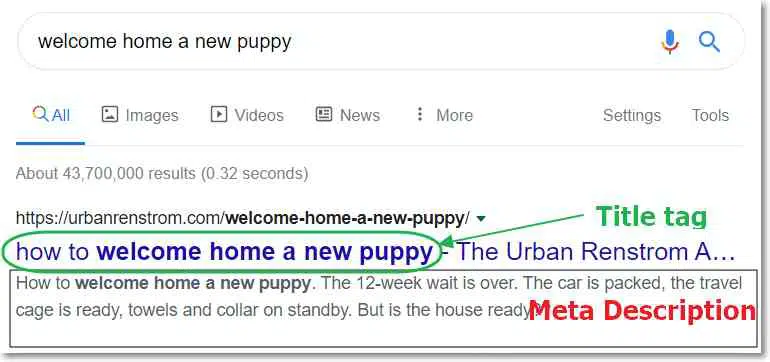
If the answer is no does not match then maybe you are in the category of ‘misleading’ or ‘deceiving’ people into clicking on a link.
This mismatch contributes to a high bounce rate.
Where to change the meta description for blog posts and pages?
I use RankMath on this website as my SEO plugin. Whilst in edit mode in a blog post or on a page simply click the edit snippet blue button.

Find the meta description field at the bottom

Don’t get me wrong that writing engaging and click-worth meta descriptions are easy. Far from it. But with practice, you will get the hang of it and you will improve over time.
7) Overall Bounce Rate Caused by a few pages
Do you have one affiliate Landing Page or Single-Page website you are sending traffic to?
What if….what if…the advice in the ‘how to welcome home your 12-week old new puppy‘ blog post was only for black labrador retriever owners?
Yet, you are driving all the Dog, Cat, goldfish, rabbit, hare, gerbils, pig, pigeon, and avian Facebook Ads traffic to this post?
Would the bounce rate be low or high?
I say high. Because only 1 out of 5000 people would be the target audience. The other 4999 are not and they would land and bounce making the bounce rate high.
Do you know which of your pages or posts are high (or low) bounce rate pages?
Log in to your GA account and we did the above – go to Behaviour>Site Content>All pages and click the bounce rate column to sort by high to low or low to high.
Assess those pages using this checklist and adjust the post/page as needed to give what people want and lower your bounce rate.
Then wait 10-14 days and assess the pages again.
8) Technical Fault with Google Analytics
If you suspect your Google Analytics installation is faulty go here and check.
FAQ – What’s the Cause of High Bounce Rate in Google Analytics?
Still not sure what Google Analytics is reporting? If a high bounce rate good or bad or is your average time on a page helping you make sales? If you said yes to any of those questions then buy a 30-minute Google Analytics session and get professional web analytics help.
Cover image credit: Mark Rabe
